OrangeChat: A Full-Stack Chat Application
Exploring the architecture and build process of OrangeChat, a real-time chat application using Socket.io.
Building Orange Chat: A Real-Time Messaging Platform with Video Calling
Orange Chat is a modern web application that combines real-time messaging with video calling capabilities. Built with React, TypeScript, and WebRTC, this project demonstrates how to create a full-featured communication platform. Let's dive into the key components that make Orange Chat work. Check out Orange Chat here
Core Features
- Authentication System
- Real-Time Messaging
- Video Calling with WebRTC
- Responsive UI with Skeleton Loading
Authentication Context

The AuthContext.tsx file provides a robust authentication system that persists across page refreshes:
// Simplified AuthContext implementation
const AuthContext = createContext<AuthContextType | undefined>(undefined);

export const AuthProvider = ({ children }) => {
  const [token, setToken] = useState(localStorage.getItem("token") || null);
  const [user, setUser] = useState(JSON.parse(localStorage.getItem("user") || null);

  const login = (newToken: string, newUser: UserType) => {
    localStorage.setItem("token", newToken);
    localStorage.setItem("user", JSON.stringify(newUser));
    setToken(newToken);
    setUser(newUser);
  };

  const logout = () => {
    localStorage.removeItem("token");
    localStorage.removeItem("user");
    setToken(null);
    setUser(null);
  };

  // Token validation and other methods...
};
Key authentication features:
- JWT token storage in localStorage
- Automatic token validation on app load
- User data persistence
- Clean logout functionality
Message Feed Component
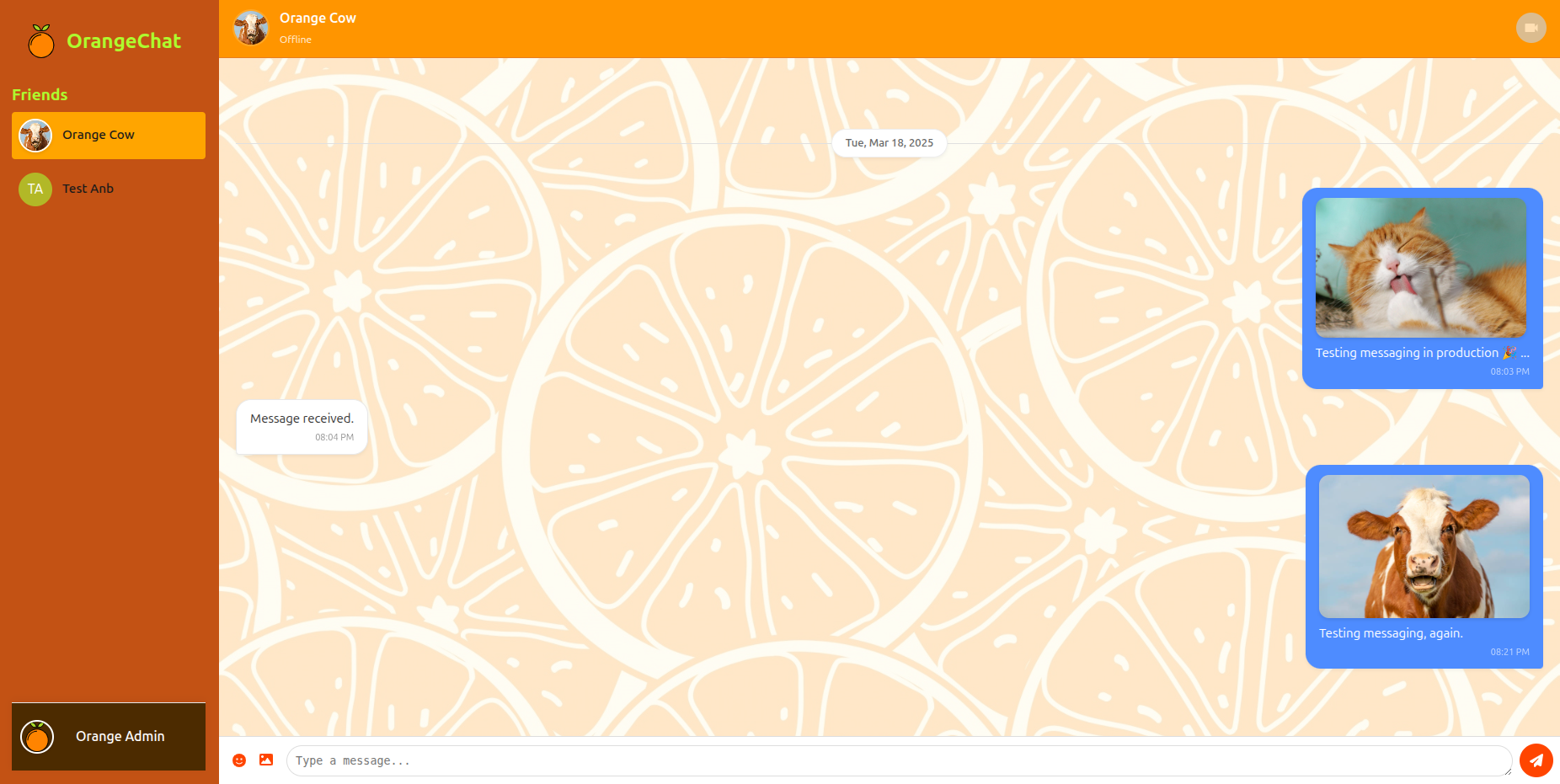
The MessageFeed.tsx component handles the display of chat messages with several advanced features:
// MessageFeed highlights
const MessageFeed = ({
  isLoading,
  messages,
  selectedUser,
  onSendMessage,
  isFirstTimeUser,
}) => {
  const { user } = useAuth();
  const reversedMessages = useMemo(() => [...messages].reverse(), [messages]);

  return (
    <div className="message-feed-top-container">
      {isFirstTimeUser ? (
        <WelcomeScreen onFindFriendsClick={onFindFriendsClick} />
      ) : isLoading ? (
        <MessageFeedSkeleton />
      ) : (
        <>
          <MessageHeader selectedUser={selectedUser} />
          <div className="message-feed">
            {reversedMessages.map((message) => (
              <MessageBubble
                key={message.id}
                message={message}
                isCurrentUser={message.senderId === user?.id}
              />
            ))}
          </div>
          <MessageForm onSendMessage={onSendMessage} />
        </>
      )}
    </div>
  );
};
Notable message feed features:
- Optimized rendering with
useMemo - Date separators between messages
- Different styling for sent vs received messages
- Support for image messages
- Skeleton loading states
- First-time user onboarding
Video Calling with WebRTC
The VideoCall.tsx component implements peer-to-peer video calling:
// VideoCall implementation highlights
const VideoCall = ({ otherUserId, onEndCall, isCaller, offer }) => {
  const [localStream, setLocalStream] = useState<MediaStream | null>(null);
  const [remoteStream, setRemoteStream] = useState<MediaStream | null>(null);
  const peerConnection = useRef<RTCPeerConnection | null>(null);

  const initializeCall = useCallback(async () => {
    const pc = new RTCPeerConnection({
      iceServers: [{ urls: "stun:stun.l.google.com:19302" }]
    });

    const stream = await navigator.mediaDevices.getUserMedia({
      video: true,
      audio: true
    });

    stream.getTracks().forEach(track => pc.addTrack(track, stream));

    pc.ontrack = (event) => {
      const remoteStream = new MediaStream();
      event.streams[0].getTracks().forEach(track => remoteStream.addTrack(track));
      setRemoteStream(remoteStream);
    };

    if (isCaller) {
      const offer = await pc.createOffer();
      await pc.setLocalDescription(offer);
      emitCallOffer({ calleeId: otherUserId, offer });
    } else {
      await pc.setRemoteDescription(offer);
      const answer = await pc.createAnswer();
      await pc.setLocalDescription(answer);
      answerVideoCall(otherUserId, answer);
    }
  }, [isCaller, otherUserId, offer]);

  // Call controls
  const toggleMute = () => {
    localStream?.getAudioTracks().forEach(track => track.enabled = !track.enabled);
  };

  const toggleVideo = () => {
    localStream?.getVideoTracks().forEach(track => track.enabled = !track.enabled);
  };
});
Video calling features:
- WebRTC peer connection management
- STUN server configuration for NAT traversal
- Media stream handling
- Caller/callee role differentiation
- Mute and video toggle controls
- Connection status monitoring
Find Friends Feature
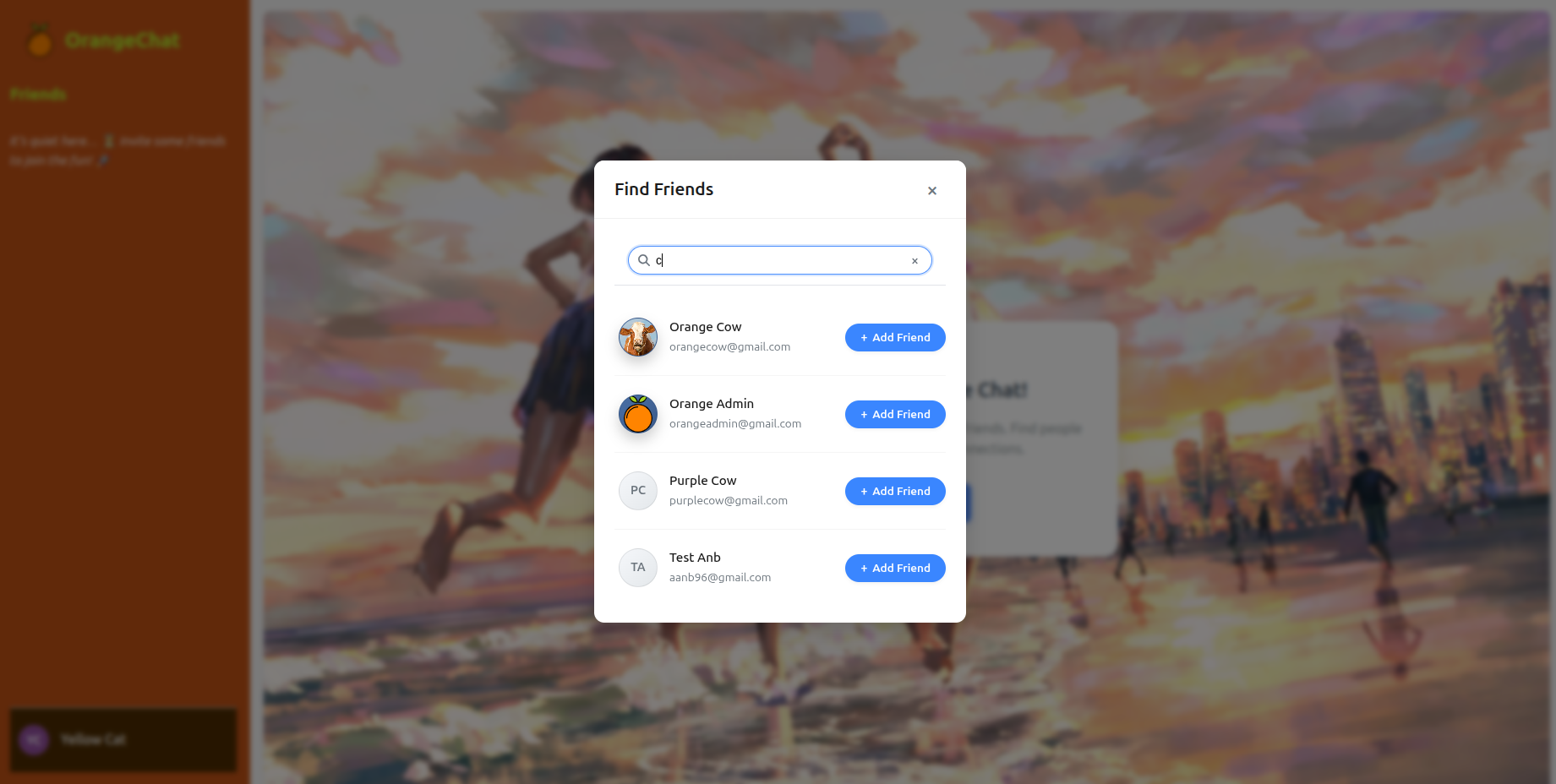
The FindFriendsModal.tsx component provides a user-friendly interface for discovering and connecting with other users. This feature demonstrates several important patterns in React development:
// Key aspects of the FindFriendsModal implementation
const FindFriendsModal = ({
  isOpen,
  onClose,
  onSearch,
  searchResults,
  onAddFriend,
  searchQuery,
}) => {
  // Component implementation...
};
Key features of the Find Friends system:
-
Search Functionality:
- Real-time user search with debouncing
- Search by name or email address
- Clean UI with loading states
-
Friendship Status Management:
- Visual indicators for different friendship states (pending, accepted, rejected)
- Disabled buttons for existing relationships
- Custom icons for each status
-
User Display:
- Profile images with fallback to initials
- Clean layout showing name and email
- Responsive design for all screen sizes
-
Modal Behavior:
- Controlled open/close state
- Overlay click detection
- Keyboard accessibility
The friendship status system is particularly noteworthy, as it handles multiple states through a centralized button configuration:
const getButtonState = (status?: string) => {
  switch (status) {
    case "accepted":
      return {
        text: "Friends",
        className: "friend-button friends",
        disabled: true,
      };
    case "pending":
      return {
        text: "Pending",
        className: "friend-button pending",
        disabled: true,
      };
    // ... other cases
  }
};
This pattern keeps the UI consistent while allowing for easy expansion of additional friendship states.
Express Server Architecture
The backend of OrangeChat is built with Express.js, providing a robust API layer for the application. The server setup in index.ts demonstrates several production-ready patterns:
// Generalized server configuration
const app = express();

// Essential middleware
app.use(
  cors({
    origin:
      process.env.NODE_ENV === "production"
        ? [process.env.PROD_ORIGIN]
        : [process.env.DEV_ORIGIN],
    credentials: true,
  })
);
app.use(bodyParser.json());
app.use(cookieParser());

// Modular route organization
app.use("/auth", authRoutes);
app.use("/api", apiRoutes);

// Production handling (static files and client-side routing)
if (process.env.NODE_ENV === "production") {
  app.use(express.static("client-build"));
  app.get("*", (req, res) => res.sendFile("client-build/index.html"));
}

// WebSocket integration through shared HTTP server
const server = http.createServer(app);
initWebSocket(server);
Key server features:
-
Middleware Configuration:
- CORS with environment-specific origins
- JSON body parsing
- Cookie parsing for authentication
- Static file serving in production
-
Route Organization:
- Modular route handlers (login, home, friends)
- Separation of concerns between different feature areas
- Clean import structure
-
Production Considerations:
- Environment variable configuration
- Frontend asset serving in production mode
- Catch-all route for client-side routing
-
WebSocket Integration:
- Shared HTTP/WebSocket server
- Clean initialization pattern
- Support for both REST and real-time communication
The server architecture supports both development and production environments, with special handling for static assets in production:
if (process.env.NODE_ENV === "production") {
  app.use(express.static("client-build"));
  app.get("*", (req, res) => res.sendFile("client-build/index.html"));
}
This setup ensures the React frontend is properly served in production while maintaining API routes for backend functionality.
Conclusion
Orange Chat demonstrates several modern web development techniques:
- Context API for state management
- WebRTC for real-time communication
- Optimized rendering with React hooks
- Responsive UI with loading states
- Secure authentication flow
The combination of these technologies creates a seamless user experience for both messaging and video calling. Future enhancements could include group calling, message reactions, and end-to-end encryption.